DJI RS 5 - Everything was Updated
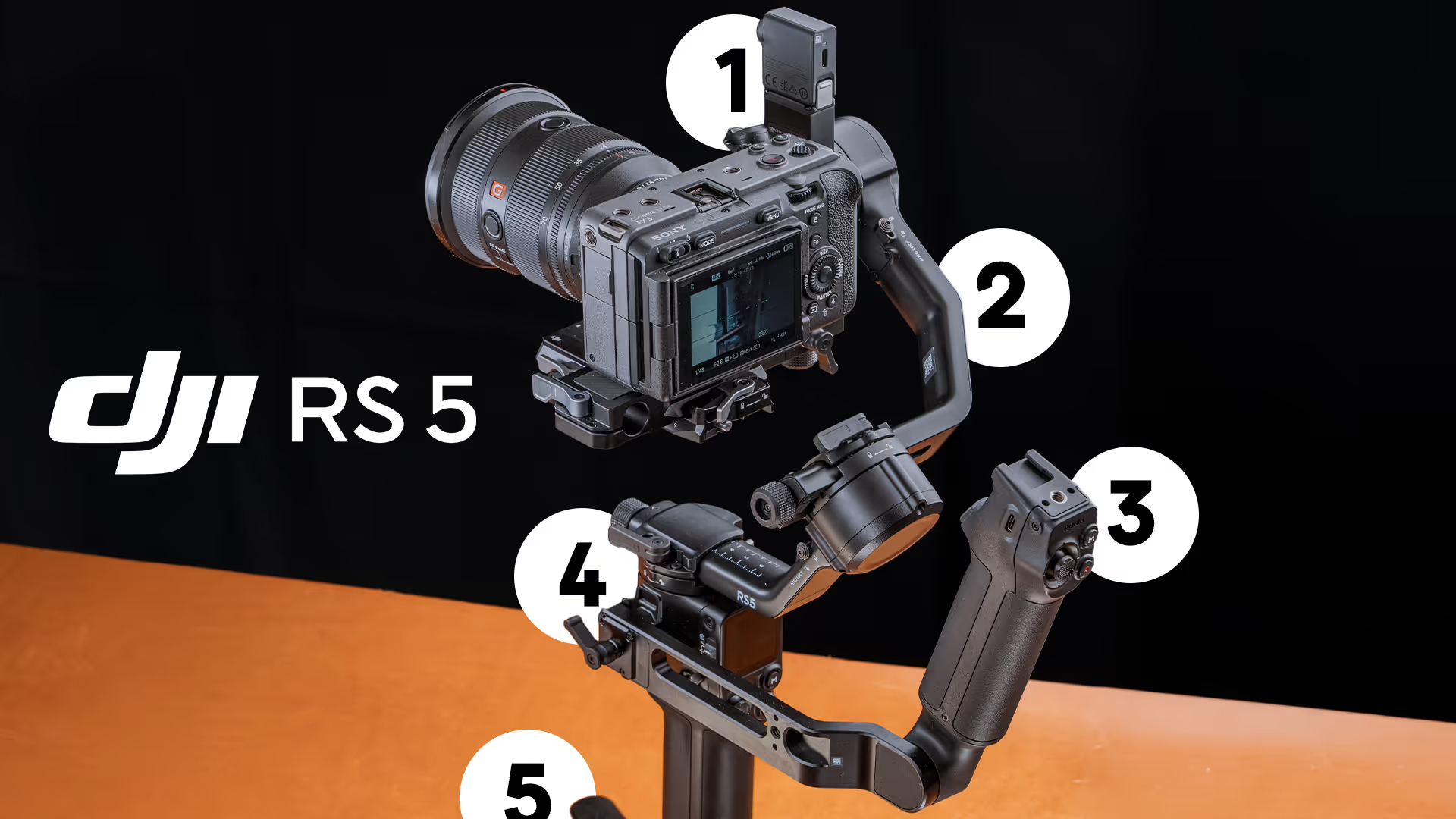
The new DJI RS 5. The latest camera stabilizer from DJI has a lot of unique features. Let's go over whats new, and my thoughts on the new gimbal!
This is the DJI RS 5. There are some small quality-of-life updates, but also some pretty big ones.
My favorite upgrade is the enhanced intelligent tracking module. And it’s as simple as,
This is the module that is fast to setup, easy to use and makes tracking shots way easier to get great results. I’ll show you some examples later in the video, but let’s go over whats new starting at the bottom and and work up.
Quick Release Tripod
The new quick-release tripod is a small, but great quality-of-life update. When you’re opening and closing the tripod, opening one leg now opens all of them. This sounds like a ridiculous improvement, but the more I use this, the more I wish my other gimbals had this.
Where this really shines is when you’ve been using it for a long time, and you go to put it down, opening one leg opens all of them. No more opening each leg to put it down.
This is a small update, but once you use it, it just makes sense.
Fast Charging
Moving up, the DJI RS 5 now supports fast charging that you can charge the gimbal for an hour and get up to 14 hours of battery life. I believe the previous RS 4 gimbals were 12 hours, which is still pretty good, but the battery life is even better on the RS 5.
Electronic Briefcase handle
Onto my second favorite part upgrade, it is the electronic briefcase handle.
The handle now attaches to the side of the RS 5 and allows you to use the joysitck, M button, record button, and trigger. There is also the cold shoe, and locking 14/20 for mounting monitors or action cameras for bts.
I love that the record button and trigger to recenter the gimbal are on the handle for using the camera in briefcase mode. Recentering and recording are the two major things I find myself doing when I’m using the gimbal, and in briefcase mode I find myself putting one hand on the tripod, and one on the handle, so if I wanted to recenter the gimbal, I’d have to go to the gimbal to do that. Being able to do that on the electronic briefcase handle is a very nice feature.
One weird thing, the handle kind of blocks the joystick function from zoom to moving the gimbal around. This isn’t a big deal for me, because I rarely ever use this switch, but if you do, that might be a little annoying. Not impossible, just takes some extra effort.
Also, there is a USB-C port on the handle and I have no idea what this actually does. I don’t have the full manual for this gimbal yet, but would be awesome if this is powered, so if you’re going to power a monitor or something, you could use the gimbal power and not have to use a v-mount and d-tap cable. Would love if thats possible, but I’m not sure USB-C has enough power to do that.
Z-Axis indicatior on the screen
Moving onto the screen, the first thing you’ll see is this bar on the side of the main menu. This is the z-axis indicator. This is nice to keep an eye on if you’re moving and don’t see if moving or if it’s green, that means the gimbal is steady. If the indicator is red, that means there is some visible z-axis shake.
This feature is a nice, but in practice is a little difficult to use if I’m being honest. Whenever I’m manually controlling the gimbal, I’m paying attention to the back of the screen of my camera.
I did use this whenever I’m using the tracking module though. Since I’m not focused solely on the framing of the shot, the z-axis indicator is actually helpful. I can glance down to the screen easier when I’m using tracking to see if there is some noticeable z-axis shake, since I’m not as focused on keeping the subject properly framed as much.
If I’m shooting something and notice the bar is red, I know in the moment I should probably shoot it again instead of going to playback, seeing there is some shake and then going back to reshoot it.
On it’s own, I think it’s an ok feature, but when paired with the tracking it’s actually more helpful.
Bluetooth connectivity
Bluetooth isn’t really a new feature, you can connect your Sony and Canon cameras, but you can now also connect your Panasonic and Fuji cameras as well. I do not have any cameras to test this out, so Im going to trust that it works.
Follow Mode Dial
The follow mode switch isn’t a new feature at all, I just like that they moved this to a switch a few generations ago and still kept it for this gimbal.
Fine Adjust Axis Dials
I’m honestly surprised it took DJI this long to add this, this next one is something I’ve wanted for a while - now each axis has the fine tuning knobs, that make balancing the gimbal faster. This is the same dial you used to adjust the camera baseplate, but now all axes have them.
While swapping lenses or adding stuff to your camera, this makes fine adjusts easier and more precise because you’re not over adjusting the axis, then it seems like you’re starting from scratch again. If your swapping to a slightly heavier or lighter lens, you still have to rebalance the gimabl for the best results, if you accidentally over adjust one of the arms, it’s like you’re starting over. The fine adjust dials make doing rebalances faster and easier, which is a great quality of life upgrade for me.
Automated Locks
The RS 5 also has the 2nd-gen automated axis locks. These are the same locks as the RS 4 gimbals that fold or recenter the gimbal when you turn the gimbal on or off. This gimbal will actually fully fold and lock all the time. The RS 4 Pro would sometimes not fully fold and lock it you were using a camera setup that was too large. Even if you have the all axis fully extended, the RS 5 will fully fold.
Vertical Quick-release Camera Plate
The DJI RS 5 also has the Vertical quick-release camera plate to switch between horizontal and vertical shooting without removing your camera from the plate. The arm comes off and is way faster than swapping the camera on the baseplate itself. You have to do a slight rebalance for the best results, but with the fine adjusts, makes it easier and pretty quick.
5th Generation Stabilization
DJI also told me the RS 5 has an updated 5th generation stabilization and increased motor torque. I have no idea how to test this, so I’m going to take their word for it on this one. Overall, as long as your within the payload, are properly balanced and calibrated, the overall smoothness of the gimbal seems to be doing very well even in casual shots where I’m not carefully walking.
Enhanced Tracking Module
Finally, onto my favorite update, the tracking module. I love how easy it is to snap this tracking module into place and the gimbal just recognizes it and connects. No cables or wires to start working. There are a few settings to fine tune, but I’ve been using this to track subjects while using the gimbal and it’s been great so far.
And the tracking is using this separate camera, so it doesn’t matter if you’re using an anamorphic lens or spherical lens, the tracking module has it’s own camera to track subjects.
Updating Settings
When it comes to getting the best results with the tracking module lets quickly go over the settings so the gimbal is working with you not against you.
Swiping from the left side of the screen gets us to the live view, and active track settings are on the bottom left. This first setting is what I mean by the gimbal working with you, Adjusting the composition to keep the subject in the current framing or center framed can save you a lot of fighting with the gimbal. The default was center, but I prefer current framing. If I want to keep the subject in the center, I just start the tracking with the subject in the center.
Next is active track speed, this just depends on what your shooting, for most things I keep it on Medium. Slow for slower reveal-type shots. Fast for cars or running.
Indicator light, when the tracking module is on but not tracking, the light is red. When tracking the light turns green.
Gesture settings, I kept mine at the default.
Finally, the most important setting, in my opinion, is the Camera view calibration. Since the tracker is an external camera, making sure your lens and the tracker’s camera are calibrated will keep your subjects properly frames.
When it comes to updating settings, I think the most important setting to update is the Camera View calibration. This adjusts the Tracking Module’s view to match your camera’s view so when you’re tracking a subject, the subject will be composed the same. Very important to get this one right.
Which Cinema Lenses Balance on the RS5?
While I feel like the RS 5 is perfect for smaller cinema cameras and autofocus lenses, you can use cinema lenses and wheel on the front to control the focus motors.
Using the FX3, DZO Film Octopus mount, baseplate, rod and focus motor, all of the Remus lenses will balance.
The Vespid 1’s will balance, but the longer lenses while using the focus motor will be slightly out of balance on the roll axis. The longer lenses are too front and left heavy to be perfectly in balance. The 12 and 21 are in balance, but the 35 is just barely on the cusp of being out of balance. It still works, and calibrates all green, but if youre moving the roll axis around a lot it might cause some issues.
The Vespid 2’s are smaller and lighter, and all of them will balance.
The Thypoch’s definitely balance.
The Arles, while the payload of the entire setup is at 6.42 lbs which is technically under the weight limit, the Arles is way too front heavy to balance.
Conclusion & Who Is This Gimbal For?
In general, I find myself using a gimbal in two different ways, either with the FX3 and autofocus lenses, or with larger setups and lots of accessories. The RS 5 feels like the perfect gimbal for those stripped down shoots with the FX3 and autofocus lenses, or even smaller cinema lenses.
The payload restrictions are really the only downside of this gimbal, but with a lighter payload, comes lighter weight overall, which could be a benefit to keep the weight down while you’re using it.
I’m going to have more DJI RS 5 content coming soon on the channel and my website, be sure to check back!
Tried something different for this one. Instead of recording in my office, I got out and shot some stuff around Cleveland. Let me know in the comments on the YouTube video what you think of this format.
Thanks for reading (or watching the video!), and I’ll see you in the next one.